Zviz is an application being developed by ILM. Currently in Beta Testing and soon to be released. If you see some info on this very interesting PREVIZ product please let me know.
Martin McEachern writes for Computer Graphics World.
His cool Computer Graphics World article gives us a little more info.
Bill Desowitz talks technology, convergence, The Force Unleashed and Star Wars: The Clone Wars with Richard Kerris, who recently left Apple to become CTO of Lucasfilm
VFX World article
T.
Wednesday, September 10, 2008


Monday, September 8, 2008
Make 'em Jump More,
A little while ago I posted on the Antics Blog a tip showing how to have a character jump over large distances and various heights.
Here is another example. Thanks to Brett for asking for clarification on the workflow.
It went something like this...
(Given that your satanic dude is on his own little "floor mat" size room already)
1.Go to direct mode and with record on,
animate devil to jump. (use jump 1, see note below)
2.scrub timeline to where he lands.
3.turn off record
4.now position room to line character up to where you want him. (by moving the little room he came from)
5.save a pose for this new room position.
6.turn record back on.
7.animate room to blendto pose.
Now you have a jump element and a room move element in the timeline.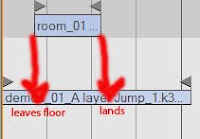
8. Adjust the room move element to eleminate sliding. (see pic)
Set the room to start to move only when the character's trailing foot is off the ground,(leaves floor), then set the end to make sure the ground is not moving at the moment the foot touches the ground.(lands)
(Note: I got weird results using the jump 2 animation, the problem was that the character would pop to the original room position once the animation finished. Seems it reverts to the original state rather than the current room position)
Here is another example. Thanks to Brett for asking for clarification on the workflow.
It went something like this...
(Given that your satanic dude is on his own little "floor mat" size room already)
1.Go to direct mode and with record on,
animate devil to jump. (use jump 1, see note below)
2.scrub timeline to where he lands.
3.turn off record
4.now position room to line character up to where you want him. (by moving the little room he came from)
5.save a pose for this new room position.
6.turn record back on.
7.animate room to blendto pose.
Now you have a jump element and a room move element in the timeline.

8. Adjust the room move element to eleminate sliding. (see pic)
Set the room to start to move only when the character's trailing foot is off the ground,(leaves floor), then set the end to make sure the ground is not moving at the moment the foot touches the ground.(lands)
(Note: I got weird results using the jump 2 animation, the problem was that the character would pop to the original room position once the animation finished. Seems it reverts to the original state rather than the current room position)
Monday, September 1, 2008
Monday, August 25, 2008
Adding to Antics
It's was quite entertaining showing off the sketchup import in Antics. "Pick a location" I ask (like a guy saying pick a card, any card), "the Eiffel Tower" was the response, in a few minutes I'd found a model and had girl walking around the base. How cool is that. In the same session we got serious and took the current script to task. In about 10mins I had placed a car on a turntable, positioned a huge megascreen behind it and set the whole lot up in the middle of a birdnest style stadium. Once I'd put a couple of cameras in the scene we started to get a real sense of how the concept was going to work. Everyone agreed the process was very quick and produced useful results straight away. There were a couple of things that would have made it even better. When I'm working one on one, on my laptop, I like to one viewport open and I like it as big as possible. I also prefer to use the master cam for this as I find the ability to orbit around a selection the quickest. At one point the director and I spent a good deal of time setting up the ideal framing, the difficulty then came when he wanted to have a object in the background moved into this frame. In this case it was the light towers, and the issue was that the axis controls where no longer in the frame. My thought here is, wouldn't it be good if I could move the item from where I select it. Or, better still, an axis for an item could be repositioned to a new point by clicking there, (similiar to the 'edit pivot' option on an imported prop).
Another feature which I desperately needed was the ability to quickly tell what lense we were on. I know you can set a freecam to get this detail but director's want to see this stuff displayed in the viewport. Also it's almost becoming a regular question from the 3d guys and compositors "can you export the camera?". It really makes sense, until you can get in on this part of the workflow, you aren't offering a full solution.
I'm talking cam export to maya/max, AE and the autodesk compositing products. Just on that, it works back the other way also. Part of Storyviz's appeal to me was the ability to import a camera move. They had a cool demo where a once a shot was 3d camera tracked, the cam data could be imported into the app and then assets could be placed into 3d space relative to the shot. Like characters running along the surface of a kitchen bench shot by a hand held camera.
While I'm on the camera side of things. The curve editor in Antics really needs a good going over. For starters the ability to cut and paste keyframes is needed. Also needed are linear and curved options on individual keyframes. I'd like to see users able to invoke a series of hand held or camera shakes easily, and when are we going to get the ability to do a dutch tilt easily!! Try it with the master cam let me know how you go.
On a side note, I was very fortunate to talk with some fellows from the computer science faculty at the local uni here and thought you might like to see what the've been working on here.
It's really innovative work.
Some of the tips I've been posting involve ways to get assets to animate in ways that don't involve poses or preset animations. On reflection, the use of cameras to perform these tasks is really a workaround. The better concept is to have Animatable Dummy Axis. They would come with many features that currently exist in the cameras and billboards, things like target, link, pin and the ability to always face camera etc, but also have other features, like the option to keyframe position and rotation values on the timeline or the option to set rotation limits, or to be constrained by the room's floor. The ability to easily cycle a motion curve would be another animation aid.
I look forward to hearing your thoughts.
Another feature which I desperately needed was the ability to quickly tell what lense we were on. I know you can set a freecam to get this detail but director's want to see this stuff displayed in the viewport. Also it's almost becoming a regular question from the 3d guys and compositors "can you export the camera?". It really makes sense, until you can get in on this part of the workflow, you aren't offering a full solution.
I'm talking cam export to maya/max, AE and the autodesk compositing products. Just on that, it works back the other way also. Part of Storyviz's appeal to me was the ability to import a camera move. They had a cool demo where a once a shot was 3d camera tracked, the cam data could be imported into the app and then assets could be placed into 3d space relative to the shot. Like characters running along the surface of a kitchen bench shot by a hand held camera.
While I'm on the camera side of things. The curve editor in Antics really needs a good going over. For starters the ability to cut and paste keyframes is needed. Also needed are linear and curved options on individual keyframes. I'd like to see users able to invoke a series of hand held or camera shakes easily, and when are we going to get the ability to do a dutch tilt easily!! Try it with the master cam let me know how you go.
On a side note, I was very fortunate to talk with some fellows from the computer science faculty at the local uni here and thought you might like to see what the've been working on here.
It's really innovative work.
Some of the tips I've been posting involve ways to get assets to animate in ways that don't involve poses or preset animations. On reflection, the use of cameras to perform these tasks is really a workaround. The better concept is to have Animatable Dummy Axis. They would come with many features that currently exist in the cameras and billboards, things like target, link, pin and the ability to always face camera etc, but also have other features, like the option to keyframe position and rotation values on the timeline or the option to set rotation limits, or to be constrained by the room's floor. The ability to easily cycle a motion curve would be another animation aid.
I look forward to hearing your thoughts.
Wednesday, August 13, 2008
A letter from a new user
I welcome the views of all users of Antics, here's a letter from Mark Willner.
He wrote...."I acquired Antics to be able to take a script and create a motion picture per se or a design for live action . Antics provides a way to explore all areas of movie making, inexpensively. I purchased the pro bundle and thought it was a bargain - a movie studio on my desktop. I did look at competitors and there are quite a few. I liked Antics model the best.Making my first Antics movie took me a lot time and was very frustrating.........................
continued in the comments section
Good points for discussion. All comments welcome. - T
He wrote...."I acquired Antics to be able to take a script and create a motion picture per se or a design for live action . Antics provides a way to explore all areas of movie making, inexpensively. I purchased the pro bundle and thought it was a bargain - a movie studio on my desktop. I did look at competitors and there are quite a few. I liked Antics model the best.Making my first Antics movie took me a lot time and was very frustrating.........................
continued in the comments section
Good points for discussion. All comments welcome. - T
Sunday, August 10, 2008
Making a bullet hole in a wall
John V Howard was wondering about creating a bullet hole effect.
I suggested using an arched window with the textures set to invisible. Copy this and rotate it until it makes a circular hole. You can scale these windows down to the size of a bullet hole.
Use the hide/unhide command to make them appear along the wall.
The use of billboards with textures of actual bullet holes will help add some detail to the edges.
I suggested using an arched window with the textures set to invisible. Copy this and rotate it until it makes a circular hole. You can scale these windows down to the size of a bullet hole.
Use the hide/unhide command to make them appear along the wall.
The use of billboards with textures of actual bullet holes will help add some detail to the edges.
Physics in Antics.
Wow, the implementation of lighting and shodows to the feature set of Antics really shows what a talented bunch they are in the Antics Labs. And it was done in a very short time it seems. I'm sure we'll be reviewing the character modification toolset in the not too distant future. In the meantime, I'd like to raise the subject of physics. As we all know Antics has evolved from a game engine technology and as such I'm sure a teamup with a physic engine like Havok would yield some spectacular results.
The wow factor when I first used Antics, was the 'click and point' simplicity of the product. The ability to get something to go from "a" to "b" so quickly was impressive, that, combined with the automatic invoking of walk cycles and animations really gave a sense of A.I. to the character. Which in turn really opened up the xreative opportunities to a user.
The next evolution of that, in my mind, is to be able to perform actions which are based on physical world properties.
Havok Physics, better known as simply Havok, is a physics engine developed by Irish company Havok. It is designed for computer and video games by allowing interaction between objects or other characters in real-time. By using dynamical simulation, Havok allows for more lifelike worlds and animation, such as ragdoll physics or intelligence in massive falling things. Another product worth investigating is Endorphin. Endorphin is a dynamic motion synthesis software package developed by NaturalMotion. Endorphin can be used to generate computer simulations of large numbers of independent characters interacting with each other and the world according to brief scripts or 'behaviours'. It combines physics, AI, and genetic algorithms to create realistic animations. Essentially it is a simulator for characters. It allows for an animation to be derived from the setup of a number of physical properties. (like Gravity, surface tension, forces and mass, that type of thing.)
The ability to expand the product's appeal to simulate real world events could bring on an entirely new market base. Imagine re-enactments and crash investigation performed realtime, after a minimal setup of variables, on a laptop, on location! (try seeing that on CSI!)
For every action there's an equal and opposite Antics Action.
The wow factor when I first used Antics, was the 'click and point' simplicity of the product. The ability to get something to go from "a" to "b" so quickly was impressive, that, combined with the automatic invoking of walk cycles and animations really gave a sense of A.I. to the character. Which in turn really opened up the xreative opportunities to a user.
The next evolution of that, in my mind, is to be able to perform actions which are based on physical world properties.
Havok Physics, better known as simply Havok, is a physics engine developed by Irish company Havok. It is designed for computer and video games by allowing interaction between objects or other characters in real-time. By using dynamical simulation, Havok allows for more lifelike worlds and animation, such as ragdoll physics or intelligence in massive falling things. Another product worth investigating is Endorphin. Endorphin is a dynamic motion synthesis software package developed by NaturalMotion. Endorphin can be used to generate computer simulations of large numbers of independent characters interacting with each other and the world according to brief scripts or 'behaviours'. It combines physics, AI, and genetic algorithms to create realistic animations. Essentially it is a simulator for characters. It allows for an animation to be derived from the setup of a number of physical properties. (like Gravity, surface tension, forces and mass, that type of thing.)
The ability to expand the product's appeal to simulate real world events could bring on an entirely new market base. Imagine re-enactments and crash investigation performed realtime, after a minimal setup of variables, on a laptop, on location! (try seeing that on CSI!)
For every action there's an equal and opposite Antics Action.
Friday, August 8, 2008
Screenshots shadow/lighting
 Some cool screenshots from Antics v4. Showing off the new shadows and lighting features.


Friday, July 25, 2008
Monty Granito - Focus on


Welcome to my first "Focus On" article, this time I'd like to present the work of Monty Granito.
I first became aware of his work through the extra's portion of the Jumper dvd. The film itself is fantastic and the work involved in creating the previz for the film is really first rate. The best part of being part of the Antics community is that, in the field of previz for film, one can find plenty of research material to develop our own skill in the field. Antics is of course, just one of many tools available in this important story telling phase. I believe Antics is a revolutionary tool in aiding everyday filmmakers, plan and design thier visions to achieve hollywood at home. As a film effects junkie, I live for the process. I'm very fortunate to be working in the field but people like Monty Granito are my idol. One day when Antics has saturated into the hollywood, ........
Thursday, July 24, 2008
SHADOWS! OMG !!!


Firstly, let me say, if you're in Australia you probably heard my scream of joy, when I saw these images from the upcoming V4 release of Antics!
These frames alone bring tears to my eyes. The shadows on the walls, the depth, the degree of softness, all these attributes indicate that Antics have nailed the shadow feature spot on. Some other apps we've seen, struggled with this task, forcing the users to endure shadow popping and noisy edges over a couple of releases, but it seems that Antics have got the tech sorted.
The release is out very soon so stay tuned.
Friday, July 11, 2008
future of Antics


At the recent webinar some exciting news was discussed about the next release. Antics V3.5
it is well worth having a listen
The biggest news was the announcement that shadows and fog lights are heading our way.
Also covered in the webinar was the adoption of user customised shortcuts, the status of facial expressions, an ANTICS version for MAC, Some wonderful news on character generator (including clothes/sizes faces, headsizes),
Topics such as depth of field, real world constraints, particle effects and physics were also noted as being on the agenda.
More fourlegged content (a present we have a reindeer) this would allow users to integrate animals with animation into work.
A measure tool, import fbx animation and a bvh editor within Antics was also talked about.
The ability to import/export data from Antics to your 3d app was also raised. The ability to improve the data exchange of camera paths between Antics and Max/Maya is great news.
It's been possible in some other applications for a while now (Storyviz) and it would be great to exchange this data with 3d and compositing applications (like After effects)
The developers put out a call for uses to define the export data pipeline (how would people use the ability to export a camera path for example....)
I also found it interesting to hear about a command console solution for text, something I'll investigate further. It is great to hear the developers are open to our input and are calling for more sugestions.
Anyway have a listen. It is very encouraging that this great product has such a great team behind it. And if you would like to discuss these features or outline features not covered, this is the place to do it. Not all the points listed above are going to make it to the next release BTW some are more for future releases.
T.
it is well worth having a listen
The biggest news was the announcement that shadows and fog lights are heading our way.
Also covered in the webinar was the adoption of user customised shortcuts, the status of facial expressions, an ANTICS version for MAC, Some wonderful news on character generator (including clothes/sizes faces, headsizes),
Topics such as depth of field, real world constraints, particle effects and physics were also noted as being on the agenda.
More fourlegged content (a present we have a reindeer) this would allow users to integrate animals with animation into work.
A measure tool, import fbx animation and a bvh editor within Antics was also talked about.
The ability to import/export data from Antics to your 3d app was also raised. The ability to improve the data exchange of camera paths between Antics and Max/Maya is great news.
It's been possible in some other applications for a while now (Storyviz) and it would be great to exchange this data with 3d and compositing applications (like After effects)
The developers put out a call for uses to define the export data pipeline (how would people use the ability to export a camera path for example....)
I also found it interesting to hear about a command console solution for text, something I'll investigate further. It is great to hear the developers are open to our input and are calling for more sugestions.
Anyway have a listen. It is very encouraging that this great product has such a great team behind it. And if you would like to discuss these features or outline features not covered, this is the place to do it. Not all the points listed above are going to make it to the next release BTW some are more for future releases.
T.
Thanks to
Gary Conway and Adrian Leu
Monday, June 30, 2008
Third Floor - FXGUIDE SEYMOUR ARTICLE
 listen to interview

Hi guys, found this fantastic article on The Third Floor. It is written by a fellow flame artist in Mike Seymour for fxguide. The Third Floor did the previz on such films as • Beowulf• The Happening• Cloverfield• Eragon• Chronicles of Narnia, Prince Caspian and are currently working on • Avatar• Star Trek• Starship Dave• Chronicles of Narnia: The voyage of the Dawn Treader• X-men Origins: Wolverine !!!!!!
If you get a chance checkout the article. It's not Antics but it's very interesting. (BTW check out the level of detail in the Narnia material, gone are the days of GREY BOXY PREVIZ, The King is Dead, Long live the King!!)

Saturday, June 28, 2008
Antics for Previz
Today I want to chat about using Antics as a previz tool for production. As you may know, I run Ammo Previz as a service to directors and producers who wish to communicate creative concepts to particular audiences. Many of you may have travelled down the same road as I did in researching and developing skills to service this growing trend.
(more in comments)
(more in comments)
Friday, June 6, 2008
bouncing ball
There are a number of ways to get your props to move (animate) in a scene.
One way is to 'direct' the prop to a given point in the room and another is to have the prop follow a path which you have created on the floor.
This article goes through some other approaches.
KEYFRAME METHOD
Using a "freecamera" and "attach" combo, it's possible to not only keyframe the move but also you get the advantage of a curve editor as well.
Experiment with attaching a prop to a freecamera. Now open a new viewport for that camera, and use this to control the freecamera, BUT use your master camera view to see what you are doing. If you do this whilst in the direct mode you can keyframe the freecamera. Once you have the move worked out, select the element on the timeline and choose "edit curve". Note, the first and last keyframes can't be adjusted so be careful with where you start and end you camera move. For those not familiar with a curve editor, it shows you the values for the x,y & z position of the camera over time.
You can adjust the curves to achieve different values for the camera position and the way the camera moves from position to position.
One way is to 'direct' the prop to a given point in the room and another is to have the prop follow a path which you have created on the floor.
This article goes through some other approaches.
KEYFRAME METHOD
Using a "freecamera" and "attach" combo, it's possible to not only keyframe the move but also you get the advantage of a curve editor as well.
Experiment with attaching a prop to a freecamera. Now open a new viewport for that camera, and use this to control the freecamera, BUT use your master camera view to see what you are doing. If you do this whilst in the direct mode you can keyframe the freecamera. Once you have the move worked out, select the element on the timeline and choose "edit curve". Note, the first and last keyframes can't be adjusted so be careful with where you start and end you camera move. For those not familiar with a curve editor, it shows you the values for the x,y & z position of the camera over time.
You can adjust the curves to achieve different values for the camera position and the way the camera moves from position to position.
In this example I create a camera move to mimmick a bouncing ball.
If you pan the freecamera you will also get control over the rotation of the prop.
An extension of this method is to tell the freecamera to target another element in the scene, in this way you can achieve some dynamic properties. For example, aligning a prop to a specifc angle regardless of position. You can try doing this whilst the camera is on a path also. This is how I got the soccer ball to spin in the Skull Shot clip. (attach the prop to the freecamera, tell the freecamera to follow a path, get the camera to target some things during the travel).
It's my hope that these animation functions become possible in the next release, until then...
Have fun.
T.
Wednesday, June 4, 2008
Rigging a Skeleton Character

To create your very own Skeleton Character you will need, 1 pair of sharp scissors (get your mum to help) 1 sheet of white paper and 1 pencil.....
oops sorry wrong blog....
To make a skeleton character for ANTICS 3D you only need Antics and Sketchup.
Start by finding a skeleton that you like the look of. Pick one which is standing upright and in a T-Pose or close to the rest pose of an Antics character.
Once you've got the skeleton in sketchup open up Antics and bring in a character. (I used the robot).
What where going to do is to move between the two apps for every limb and bone set.
1) The first thing to do is select the desired bone in sketchup then follow these steps, "ctrl c" to copy, "ctrl a" to select all then hit "delete" to clear the page, now choose edit "Paste in Place". This will give you just the bone. Now save as .skp and name it something usefull. (like Lfoot.skp) ok now "ctrl z" to bring back the full skeleton ready for the next piece.
2) in Antics, import the Lfoot.skp and do not move it. (you may want to apply a scale as you import if the object is too small, do the skull as this will help set the scale value) Now notice that in the props list you have a Lfoot file.
3) go back to step 1) and repeat many times....until you have the whole skeleton in.
Now still without moving anything in Antics, Select each prop and right click "edit pivot". You'll want to set the pivot to be where the joint is. (eg a forearm bone pivots at the elbow)
Congrats you have a rigged skeleton!! Now to get the Antics Character to drive it.
The concept here is to closey align your skeleton to the underlying skeleton of an existing Antics Character (AC). The closer your wrist is to the AC's wrist the better
the animation. You can select all the props that make up your sekeleton and scale, move and rotate the whole set into a position 'within' the AC. Ok. Now I used a command to get each bone attached the the AC joint. If you haven't checked out the command console, do yourself a favour. It's in View/Command Console.... once open type (tip... once you start to type you'll see a list of valid syntax, just select the word you want and then press space bar, now you can start on the next entry)
it should read
attach Lfoot Robot_01 Bip01 L Foot
This command will attach your skeleton's leftfoot to the AC's Lfoot. (I chose a robot as my Antics Character)
Do this for all your bones and you are done. Now hide the AC. Select the AC in the character list and direct it to walk somewhere, or do something and you'll have your new character.
If you want another skeleton character, select the AC in the Set/Character list, CTRL D and then Ctrl V.
This procedure of mapping rigid bodies to AC skeletons/joints can also be applied to ANTICS Animated props.
oops sorry wrong blog....
To make a skeleton character for ANTICS 3D you only need Antics and Sketchup.
Start by finding a skeleton that you like the look of. Pick one which is standing upright and in a
T-Pose or close to the rest pose of an Antics character.Once you've got the skeleton in sketchup open up Antics and bring in a character. (I used the robot).
What where going to do is to move between the two apps for every limb and bone set.
1) The first thing to do is select the desired bone in sketchup then follow these steps, "ctrl c" to copy, "ctrl a" to select all then hit "delete" to clear the page, now choose edit "Paste in Place". This will give you just the bone. Now save as .skp and name it something usefull. (like Lfoot.skp) ok now "ctrl z" to bring back the full skeleton ready for the next piece.
2) in Antics, import the Lfoot.skp and do not move it. (you may want to apply a scale as you import if the object is too small, do the skull as this will help set the scale value) Now notice that in the props list you have a Lfoot file.
3) go back to step 1) and repeat many times....until you have the whole skeleton in.
Now still without moving anything in Antics, Select each prop and right click "edit pivot". You'll want to set the pivot to be where the joint is. (eg a forearm bone pivots at the elbow)
Congrats you have a rigged skeleton!! Now to get the Antics Character to drive it.
The concept here is to closey align your skeleton to the underlying skeleton of an existing Antics Character (AC). The closer your wrist is to the AC's wrist the better
the animation. You can select all the props that make up your sekeleton and scale, move and rotate the whole set into a position 'within' the AC. Ok. Now I used a command to get each bone attached the the AC joint. If you haven't checked out the command console, do yourself a favour. It's in View/Command Console.... once open type (tip... once you start to type you'll see a list of valid syntax, just select the word you want and then press space bar, now you can start on the next entry)
it should read
attach Lfoot Robot_01 Bip01 L Foot
This command will attach your skeleton's leftfoot to the AC's Lfoot. (I chose a robot as my Antics Character)
Do this for all your bones and you are done. Now hide the AC. Select the AC in the character list and direct it to walk somewhere, or do something and you'll have your new character.
If you want another skeleton character, select the AC in the Set/Character list, CTRL D and then Ctrl V.
This procedure of mapping rigid bodies to AC skeletons/joints can also be applied to ANTICS Animated props.
view example
Monday, June 2, 2008
FREE STUFF and SKULL SHOT


A good supply of free motion capture (.bvh) is mocapdata.
Also if you are in need of a no-nonsense audio editor try Audacity
I for one like the term ANYMATION which Overman has forwarded to the Antics Forum. original article I had heard the term used in dscussion here and there and I think it is closer to describing Antics clips than the Machinima label. I don't think it's the best name, I'm just not offended by it.
On another note, I had a little fun with my newly built skeleton dudes, now that's using your head!
T.
(btw, I did the sound also)
Thursday, May 29, 2008
WELCOME ANTICS USERS
If you're new to this blog welcome, remember when you get to the bottom of this page there's another few packed full of tips and stuff. Also check out this article
as well. It's makes for some interesting reading. All comments welcome.
Happy Antics -ing!
Monday, May 26, 2008
Skeleton walks - DFA

Today is my birthday and I thought it would be cool to map a skeleton bone for bone with an antics character. Well it took a while but the results are way cool. Now I have a skeleton that walks! Here's a little taste of what I'm thinking of doing with him. cheers. (it's dfa direct-from-antics)
Saturday, May 24, 2008
Emotions for Antics!
HOT OF THE PRESS May 23, 2008 •
"..............we now have Ian Wilson working alongside our development team in Cambridge. Ian is the founder and CEO of Emotion AI (http://www.emotionai.com) and over ten years of experience in Europe and Japan of applying technology to simulate how humans react . .....................It will take some time to integrate an emotions into Antics and make them as easy to use as we, and you, would like and fit them in with other developments, so you will have to be patient for a while. In the meantime, don’t forget that there are ways to get emotional impact in Antics videos using music ,camera cuts etc. – Tony Bannan’s videos “Looking Back"...........".full story
"..............we now have Ian Wilson working alongside our development team in Cambridge. Ian is the founder and CEO of Emotion AI (http://www.emotionai.com) and over ten years of experience in Europe and Japan of applying technology to simulate how humans react . .....................It will take some time to integrate an emotions into Antics and make them as easy to use as we, and you, would like and fit them in with other developments, so you will have to be patient for a while. In the meantime, don’t forget that there are ways to get emotional impact in Antics videos using music ,camera cuts etc. – Tony Bannan’s videos “Looking Back"...........".full story
Subscribe to:
Posts (Atom)