Friday, May 23, 2008

Ned Kelly Dance


Ned Kelly is an Australian icon. He was a bushranger, who, to aviod being shot whilst robbing banks, built a helmet and chest plate forged from iron. I guess he was the first ironman! Anyway I've built a little Ned out of lego and animated them in Antics. The pieces are imported separately and linked to various joints on a standard character. Once everything is hooked up the legoman will do everything the ref character does. Then it's a matter of hiding the ref character.

The lego parts are freely availble from Ldraw and LeoCad. There are hundreds of lego style props to import into antics to create your own lego clip! Good luck.


Wednesday, May 14, 2008

zombie

A zombie effect can be achieved easily when you combine the pin tool with the link tool. The setup is just like the "pushing wheelchair" topic covered in an earlier post, the plan is to create a sphere for each wrist. place the sphere on the wrist and the pin the wrist to the sphere. Now if you link/attach the sphere's to the character then the arm animation will be overwritten (made void). If you place the spheres away from the body then the arms can be set to extebd forward just like a zombie. My favorite zombie films are....I am Legend, 28 days and Shaun of the Dead. Have fun!!


Oh, btw, I got the texture maps from the web, and the character is a cowboy (you may want to experiment with different walk cycles for the character and slower durations in the timeline).


youtube

Monday, May 5, 2008

Reflections

To create a reflection, like the one in my bathroom scene in Folie or in the pond scene by raybearmass is simply a matter of creating an identical set and then rotating it 180 degrees. Sometimes I like to use the frosted glass texture, (it's from one of the doors), to create a material for the glass, then adjust transparency to suit.
raybearmass also found this great app for making your reflections move

On a personal note, I've now started work in my new job in my new city and so I'll post some of my Antics-Lego experiments soon. Thank goddness for sykpe so I can keep intouch with the family.

Friday, May 2, 2008

How to make a Sketchup MECH walk in ANTICS


There is a wonderful tutorial on the Antics Forum, thanks to Robert Kim and Eric Rosoff from the Antics Team.
You can see a sample clip here

Saturday, April 26, 2008

Good Camera placement.

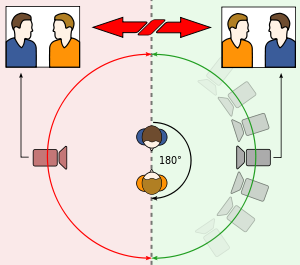
The 180° rule is a basic film editing guideline that states that two characters (or other elements) in the same scene should always have the same left/right relationship to each other. learn more If the camera passes over the imaginary axis connecting the two subjects, it is called crossing the line. The new shot, from the opposite side, is known as a reverse angle. Some filmmakers state that the fictional axis created by this rule can be used to plan the emotional strength of a scene. They believe the closer you place the camera to the axis, the more emotionally involved the audience will be.
Here is an image you might like to apply to a billboard. Use the billboard in your scene to line up your cameras if you wish. Just set the billboard to be half as high as it is wide, and set the texture blend property to ADDITIVE and turn DISABLE LIGHTING on.

Sunday, April 20, 2008

v3.1

A welcome addition to the Antics/previz armoury is the ability to import .skp from Google's Sketchup application. The latest version of Antics V3.1, just released, allows you to import models and textures into Antics in one simple step. The .skp file format joins the .3ds .fbx and .bvh which are already supported.

Sketchup is great buddy to Antics as it also features a simple yet powerful workflow and fast results. It's a 3D software tool that combines a tool-set with an intelligent drawing system, plus you can create models using real-world coordinates. Best of all, it's also free! Check out sketchup .

Another very cool feature is the Google 3d Warehouse option which is just under the import selection. If you are on-line, you will be taken direct to the 3d Warehouse via a window within Antics. Once you've found something you like, it's as simple as clicking on it, follow the prompts and BAM ! it's in your scene ready to go. The process allows you to download free content straight into the scene. (very cool )

You can find out more from the Offical Antics Blog which has also just been launched. (Thanks Gary.)

Tuesday, April 15, 2008

Antics Community Callout!

Antics is such a cool program, the developers have really done a fine job of keeping the product user friendly. The latest move to make the application free has no doubt increased the user base.
So now we have a great variety of users of all skill levels. The aim of this blog is to share experiences and opinions about ANTICS and previz. If you have a story you'd like to share, or a subject you would like covered in depth, please leave your comments, or send me an email. (ammo(at)previz(dot)com(dot)au

I'd like to welcome Gary Conway back to the Antics support team. He was fantastic in helping me through my questions when I first started with Antics!

Saturday, April 5, 2008

MOCAP and Mr Bones

BVH files are motion capture data, which when imported into Antics, allow your characters to replicate the moves made by the original actor. The data is collected by various means, commonly, markers are placed on the joints of the actor so that xyz information can be extracted. Most often this is achieved with little white balls sewn into a catsuit style garment.The actor performs in front of a camera array to collect the info. Data is constructed by then plotting the movement of each ball. Many camera views are required to get accuracy. Another method I saw recently was a solution designed by a N.Z. firm which utilize little geo magnets. In this way the data is much much more accurate and doesn't induce the problems associated with camera rigs, lighting and limb crossover. In fact this approach allows an actor to get on a horse and ride away in full sun on location! Both the actor and the horse can be rigged with the collectors. If you would like to try out the bvh path with Antics, Mr bones has offered a free sample of a Jedi bvh. http://www.truebones.com/JediBones.zip

Sunday, March 23, 2008

animation creation


Here is a video introduction to a free app called qavimator. Developed as a tool for Second Life, it has the abilty to *import, edit and create bvh files. As you all know, with the latest version of ANTICS3D, it's now possible to import .bvh and either have a character "play" the animation or set in the character's properties tab. It's my first vid tut so I hope you like it. I found using the application fairly straightforward. (left click and shift left click and thumbwheel for cam view). Click on a body part and then adjust the sliders on the right. Move your timeline along and set the next pose. A nice feature is the ease in and ease out options with is available for each keyframe. (I'd love for antics to adopt this!) It means your characters movements won't be robotic. If you want to go back and change a parameter then just click on the keyframe in the timeline and off you go. Very clever design, nice job.
I wanted my character to move smoothly from the antics sitting pose to the first frame of the custom animation I was creating. So to align the Antics character with the model in qavi, I set up the Camera views in both apps to match, (the window sizes) and then set the qavi tab to 'Not' protect first frame. Now it was simply a matter of posing my qavi girl to match the Antics girl. It took three gos. So have fun, oh I did discover one bug, the app doesn't like all .bvh files. Let me know how you go.

Update: thanks to JPiazzo
Carnegie Mellon University has a HUGE collection of free motion capture files 2605 in all vailable for download free with no use restrictions. They have a database that you can search and small video files of each motion. They are in tvd, c3d, and amc format not directly compatable with Antics but this tool AMC2BVH, http://vipbase.net/amc2bvh/ will convert them to BVH files also get another free program bvhacker here: http://davedub.co.uk/bvhacker/ you'll need this also.
I downloaded the entire archive here http://mocap.cs.cmu.edu/faqs.php once the CMU .amc file is converted to BVH it will import into Antics - but not perfectly. Most of the problem is in the initial arm offset ( left and right clavicle & humerus joints) also sometimes neckalignment. I have had success editing these files prior to import in the bvHacker program using XYZ offsets.(If you try rclavicle z +19, lclavicle z -19 lhumerus z -50 rhumerus z +50 as a start) Also these files are recorded at 120 frams per second which will play slow in Antics. Bvhackers Frame Time function can re-sample the speed though. You can also trim the moves into smaler parts which is a good idea as some captures are quite long but have many good smaller moves like turns, twists, and walk run stop transitions. I'd be happy to do a tut if I figure this all out.

Sunday, March 16, 2008

Skype discussion on Folie

There will be a skype chat 1pm Pacific time. march 16th. all welcome
just skype ammopreviz or ricky grove to join in.
FolieProduction notes

Thursday, March 13, 2008

Baking Shadows

Not such a new practice these days is baking. No not cakes, it's the term used by 3d guys to speed up renders. The method is to have the app create really cool lighting and shadow effects which can be rendered out as texture maps with the effect baked in. I've done some tests with a simple version of this. Say you want some shading where a floor meets the wall. You can paint a texture map which looks like a very fuzzy black line with a suitable alpha or matte channel. Then place on a billboard and put wherever you want shadowing. The same goes for lighting efects on a wall. Like sunlight from outside. Right click textures, then right click edit, gets you into the (colour texture blend options) controls. Enjoy.

T.
Oh BTW I'm moving cities/jobs (film at last!) so my blog enteries may be a little light in the next 2 months.

Machiniplex - Skype Chat

--------------------------------------INVITE-------------------------------------------
Hi everyone! I am a machinima filmmaker and I manage a site (Machiniplex.com)devoted to quality machinima films. We began in October of 2007 and have "Premiered" 5 machinima films. Recently, I invited filmmaker Tony Bannan to Premiere his film "Folie a Duex" at machiniplex. If you frequent this site much you'll know that Tony won the recent Antics "Medical Theme" contest with his film. I asked him if we could present his film at our site and in addition have a Question and Answer session with him on Skype. He agreed and will be appearing on Skype this Sunday March 16th at 1pm (Pacific Time) to discuss the making of his film and to answer questions. For those who have never heard/used Skype, it is a free internet voice/chat program favored by machinima filmmakers for discussions and collaboration since it can connect people from all over the world via voice or text. Check Skype.com for details. If you don't have a microphone, you can use your keyboard and join a text chat. "Folie a Duex" is an excellent film; well made, imaginative and uses the Antics program to its best. Come by our Skype chat if you'd like to talk to Tony and learn more about this terrific film. -Ricky GroveMachiniplex.com

Sunday, February 24, 2008

I WON!

Wow, I won the Medical Comp! How cool! I loved seeing the other entries. The whole reason I started this blog was to build a community where we got to share each others work and swap battle stories!


Some really cool clips came out of the comp, and there are some cool clips showing up on the Antics gallery now. I love the Pawn trailer, and the Coward clips, the July Snow clip strikes a cord as does the Diamond Chaser and Have a Ball pieces.Crash Test's opening sequence is really cool (that stuff looks easy but it's always harder than it looks), & Medical Antics (I need a machine like that). My current fav is Antics ER. I love anything that takes the micky out of the establishment. Also I liked the soundbyte at the head. Anyway here is the Folie clip on a larger display along with a Folie COMPARE clip which helps show what can be done even without a post pass. Just for interests sake here is the Looking Back along with it's compare clip Looking Back COMPARE.
Some of you may have seen the tower I built, it was driven by a post on the forum which mentioned multi-level sets as being a feature Antics had over it's competitors. The tower ended up featuring in my Folie clip, along with the chopper. I was really happy with the chopper blades, I duplicate three blade sets and offset them slightly, adding levels of transparency gave them the feeling of motion blur. The low angle shots in particular looked good. The other scene I had in my head very early on was the bathroom sequence. I wanted to mess around with the concept of a mirror image.
So I built the bathroom set with a picture frame cutout on one wall. Then I pinned the hands of two identical characters to each other so that the performance resulted in a mirror image. It was made a little more difficult by the (Head Swap out) adjustment to the character and by the building/matching of a duplicate set with lighting on the "otherside". Each tile was a squished cube to allow for the popping out effect. whilst this was tedious it gave nice lighting results as each tile edge caught the light. The naked lady in the bath is achieved by setting the dress texture to invisible. This is also using the head swap out The basin/basin reflection water levels shared one billboard. On the wall, the dress hanging on the towel rack is the original towel but with the dress texture applied. The ship was scaled down (I wanted smaller but 0.01 is the limit). As it turned out the entire sequence evolved and the mirror shots were dropped in the cut. Speaking of the cut, my edit actually ran to 3mins before I re-read the rules and found I had to trim 1min off! Doh! The long version is on the tube if you're interested.The next set I built was the padded cell. The cell is actually made of armchairs, which gave it that curved surface feel.
The corridor set was developed as a way of getting the nurse/trolley moves to also add to the storyline. The little control rooms were really just one room duplicated many times. I used sketchup to quickly build the shape of the room and then Antics a lighting prop to dress the ceilings. I like the guy in the wheelchair. I used the pinning technique to get the girl to push the trolley along. This corridor sequence was always meant to be an opportunity to have lights pass over the character (like in Jacobs Ladder). Didn't quite get there though. The eyes close effect is done with a painted texture map and some spheres for the eyes. The best result was to painted the eyelash in the closed position. If I duplicated the head and had one setup with eyes open I could do blinks! (excited!). My favorite moment is the ocean scene. The ocean is made up of a scaled down rolling hills prop with water texture. The trick was to duplicate the hills prop many times and tile up a very large ocean. The ship was rigged to rock and roll like on a gimble to set poses. Setting rooms to the deck sizes helped the process. So then I simply direct the ship to blendto the poses and made the ocean pass along. These elements appeared in the timeline so it was easy to adjust timings base on the camera move.
The entire content for the Folie clip was derived from the ANTICS content library. This is with the exception of the corridor set and the island. All questions comments are most welcome.

Monday, February 11, 2008

New content

If you're reading this then there's a good chance you've got Antics.
If not then get it, it's free after all. Anyway, the weakest link to the whole Antics solution is the character creation aspect. So I wanted to appeal to you guys (and girls) to help sort this out once and for all. I need to hear your suggestions and solutions to getting more character content into Antics. Let me start the ball rolling by thanking user "cmbubak" for the FACEGEN tip, The faces in the image are imported as .3ds models and placed onto one of the pirate characters. It took about 2mins! once the head is in position you can attach it to the body's head node in a command line. That way it'll allow you to walk the new character and still use the lookat features. (ish)

I've also checked out Quidam, and poser. I always run into a dead end with the skeleton setup.
Ideally if we can find a solution that doesn't involve 3ds MAX, then that would be heaven.

The main topics for discussion are FACE MAPPING and SKELETON RIGGING.

Please, if there's anyone out there......

Friday, February 8, 2008

Lighting part two


Here's another example, there are only two lights on in these scenes.

Monday, February 4, 2008

lighting

Some really cool lighting setups can be achieved within antics, take this
"Livetime Partner for one night love" store.
The lighting is achieved with 5 lights! and it's straight from Antics.
Comments welcome.

Sunday, February 3, 2008

Adding frosted glass to your texture library

Ok, now I need to say clearly "TRY THIS AT YOUR OWN RISK" but I'm quite fond of the frosted glass texture which comes with one of the doors.
Thing is, I wanted it in my standard glass texture folder, to save me loading that door every time. So here's the thing, find the frosed_glass.tga and copy it to
C:\Program Files\Antics\Antics3.0\Content\Base\Textures glass\maps
now find the glass_frosted.ksh and copy that to
C:\Program Files\Antics\Antics3.0\Content\Base\Textures glass\shaders
Now save your project and you'll be in biz.
The Frosted glass texture will now appear in the glass textures folder.
This method may not be supported officially, but it works!

Friday, February 1, 2008

Land of the Giants

Got an email request from Mr W. -Hi, I'm trying to create a scene in Antics V3 where a giant is chasing normal sized people. Do you know if there is a way to scale up my giant so he looks much taller in than everyone else?
There is a trick with this that might work, it's borrowed from one of the lord of the rings effects. The hobbit on the cart with gandalf was achieved 'in camera'. That is, the smaller hobbit and the larger wizard were in fact two full size adults sitting on the same rig. The principle is simple, objects closer to camera appear bigger.
Now, because Antics has not got a depth of field (that is there is no focus) the objects further from camera appear smaller than those up close without focus giving it away. In this way you can have characters running away from a giant by positioning the characters at different distance from camera. It's a limited approach though. The idea is also helped by scaling prop items in the background and foreground so that the characters appear a set size. It really works for a side shot. In theory you could force this perspective from a top shot also, like from the giants' pov. Just use transparent floor textures on the giants floor, lower the little people's room untile the are, well, little! (further from camera) I think scaling buildings down when showing the size of the giant would help a lot, also run the slow the movements down slightly to give the giant weight. Have fun, and let me know how you get on.

Tuesday, January 29, 2008

Swap geometry


It's possible,even usefull, to be able to swap out the geometry on the timeline. The best example is if you want to have a character to change as a result of say, a blast from a strange transformation wand (ala hpotter style). Or, perhaps like in my example, you may want the characters to cycle through during a handshake. The key is to load a new geometry in the properties tab (select object, right click properties, then select the geometry of a prior loaded character.) Most will allow a swap out, but not all. Also you may find some weird eyeball repositioning.
This also works on props, so next time you want a burger to turn into a lemon, just do it in the timeline!
BTW to get the camera to do the move in the sample clip, get a sphere to travel along a path strung between the characters, then have your freecam follow a curved path that sweeps around the talent. Now if you get the freecamera to target the sphere at the start of the timeline, you'll have some great control over when the camera moves and also when it pans!

Sunday, January 20, 2008

Have a Ball

Check out the new clip on the Antics site by CJ AMBROSIA, it's really cool. I like the guy getting hit on the head and the jet shots. Good use of Antics for a cute idea. Be nice to hear how the approached the ball motion. I guess you have some choice there, you could set up a path, get the ball spinning and then have another axis follow the path, you could do it with poses, although only for straight lines, Or, you could use a camera to keyframe the positions and then link your spinning ball to the camera. You only use the camera as a way of getting a keyframable motion. This way you can set your curves, to get the bounce etc. Try spinning the ball on a little room and then tell the room to move around, this might make direction easier.

Anyway, thanks for sharing CJ.
Look forward to the next one.