Monday, January 7, 2008

Getting the doc to push the chair!


Hi, here's my method for getting the Doc pushing a wheelchair, hope you can follow it.

I like to use little sphere's to control my character's hand and feet. The idea here is to create little spheres (about a fist size) and position them right on the wrist of the character. Now pin your guy's hands to the sphere. You'll find the other hand needs a correction rotation.
Once you have you hands pinned, it should look like he is wearing a sphere on each wrist.

I find it easier to position the hands now as the sphere size can be adjusted (using the scale tool )very quickly and the wrist joint can therefore be selected without having to go through the skeleton method.
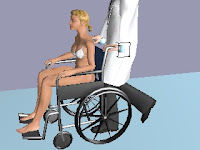
Okay, now for the wheelchair. We'll get two chairs on our set. Make the wheels transparent (bottom of list of textures) for one chair and have only the wheels showing for the other chair. This'll give you the chance to rotate your wheels. If you don't want to have your wheels move then skip this step. Load up a dummy axis and set it to be at the center of one wheel with the blue axis at right angles (perpendicular) to the wheel. Under content, load up the 360_z_anticlockwise animation (it's under animations,prop, rotations). Add the animation to your set. Now go to the Library folder in the Project bin and right click on that animation you just loaded. We are going to set the Cyclic tab to infinite under the Object Properties for that animation. Good. Now test your setting by clicking on the dummy and have it play the rotation animation. You use the waving hand icon. Your wheel should just keep turning and turning and turning. Click interrupt to stop it. Line up your wheels to the chair body and then link the dummy to the chair.


Set each sphere to the handles of the wheelchair so that the doc is in position. He'll end up real close to the back of the seat. O.K. now draw a path along the ground where you want them to go. Position both the doc and the chair to the start of the path. In direct mode, direct your chair to travel along the path, then do the same for your doc. You'll need to tweak the timeline elements until the two are travelling together. Don't forget to tell the dummy to play the rotation animation once the doc starts to walk and then interupt it when he stops.

Good luck! (thanks to Eric for the Cyclic tip)


Here is Dr Phil taking another patient for an extreme makeover!

Sunday, January 6, 2008

V3 Thoughts - Scale tool

Welcome to 2008. We've all been enjoying the new scale tool in v3, I find it very useful and it opens up some new tricks also. You might have noticed you can adjust the scale of billboards with it but perhaps you didn't know it can be used for paths. When building a reindeer flyover
recently, I wanted the effect of many r'deers on different paths swooping over some poor chap.
I found that if i built the paths in miniture, I could design a nest of paths without having to more the camera very much. Then when I was ready, I just scaled everything by the same value.
Very cool. I'm loving the .fbx from sketchup pipeline now. I wish there was a global (no lighting, etc) option for the texture maps. Also I would like the invisible texture to be moved over to be next to the colour option in the select texture dialogue box.
I like the content browser changes in v3. I often dock this window so that it stays open and I can drag bits into my set.
Working on my medical clip..... catch ya...

Sunday, December 16, 2007

New Face mapping


Welcome to the holiday season!

Just a quick note to check out the Christmas pack.It's very cool.

Our first quadped ! Some very funny clips can be made using the reindeer and biped animation!

Also check out santa's face map, now we can customise left and right sides! Let's hope this is the way all maps are done!!
Of course the first thing I tried was to try and swap out a horse geometry for the reindeer, no luck there, (the horse doesn't have a skeleton, so it's a prop not a character.)

Here's a test using crazytalk5, there's got to be a way of getting this onto my antics santa,

Maybe if I write to Santa.......Dear Santa, I know I've been kinda good, any chance you'll let me project textures onto geometry or something......

Merry Christmas!!

Saturday, December 1, 2007

Comments by Scott Squires

Here are some excerpts from a correspondence I've had with the wonderful Scott Squires who is an incredible visual effects veteran. Some great critque and tips for all previz artists.

Hi Tony,
You've got some nice work. Most of the previs work done here is related to visual effects and heavy stunt work. That usually means some type of action sequence .......

(article continued in comments section)

Friday, November 30, 2007

Antics 3d - GAGTRABWTFDAH project.

Antics has a very strong design function which allows you to pin a character's hand or foot to a prop. I read in the manual way back in version 2, something about a bicycle. So I thought I'd give that a go. Let's call it my "Get a girl to ride a bike, with two friends, down a hill project" ..................
(Continued in the comments section!!!)

Update: It's done and on youtube. Great music too.
GIRLS ON BIKES

Thursday, November 15, 2007

ANTICS 3D - PERFECT!


Well, I've started on my next little project. I thought I'd go all out and try to make the coolest most elaborately staged film sofar. So here's a sneak preview at how it's coming along. I can't tell you too much about the story (not yet) but I'm hoping to do something kinda cool with this multistory apartment block I've got stuck in the middle of an ocean!


You just gotta love ANTICS. what other progrm will let you build a tower in 30mins and then let you simply click on a guy at the bottom and say 'walk to the top buddy' and then watch him do it. Through doors up stairs etc. back to it...........

Wednesday, November 7, 2007

Monday, November 5, 2007

Wednesday, October 31, 2007

lighting a whole city


On the Antics forum there was some discussion about lighting. This is one of my favorite parts of doing a sequence. Lighting can add so much atmosphere to a scene. But what about lighting an entire city! Well I still think it comes down to the framing of the camera as to what you should light. Antics has 7 lights available, even full sun requires many lights to help "model" subject matter. The key to making the scene interesting is using some touchs of colour. Early light or sunset (Magic Hour) is most favored by cinematographers as it provides good shadows as the source of the light is low in the sky. You can have lots of success if you experiement with the properties of the lights. Another tip is to set your icons to 500 when you have a camera so far away from your set. That way it'll be easier to adjust light positions.

Send in your lighting rigs, I'd love to see them.

Friday, October 26, 2007

previz articles

the power of previz Computer Graphics World : Article By Audrey Doyle

Pixel Liberation Front (xsibase.com)

Kent Seki
The Creative Director of Pixel Liberation Front talks about Sky Captain and the World of Tomorrow, The Matrix Revolutions, the process of Previs and the cg industries in California and New York

Interview with Colin Green
Pioneer of Previsualization and founder of Pixel Liberation Front Colin Green talks about the early days of cg, modern filmmaking, the importance of previs and how it all began. Credits include Fight Club, Panic Room, Eraser, Matrix Reloaded, Matrix Revolutions, Minority Report and Superman Returns among others.
April, 1st, 2007, by Raffael Dickreuter

Saturday, October 20, 2007

aliens!

Well, as usual I've sat down to write a quick bit on my latest clip, and ended up back in Antics creating some other stuff to post on the blog! Just like the frames in this article I used an ALIENS technique on the "Autopilot" music clip, which I just finished last night for "The Selfish Gene". Lucky for me they were after something weird and 2001 ish. I'd been playing around with swapping out geometries on models and got some fun effects. The alien character especially has a cool look. To achieve this effect, start by adding baby fred to the scene your hero is in. Then display your hero characters properties panel. In the geometry area there's an option to 'add', select a baby geometry (baby_fred.k3d). Now your hero's geometry will be replaced by the baby geometry. All animation will be available. If you like you can experiment with different combinations. I found that all the assets will match, but it can be fun. I like the dwarf character you can get by adding male geometry to the baby property!!

Back to the music clip, I built a number of rooms which contained the alien guys and some chairs. These rooms where then duplicated and rotated slightly. They were lined up to form the inside edge of a huge cyclinder. A bit like the rim of a wheel. Each room edge lined up so that one alien could actually walk around the whole rim!

The clip was done in about 2weeks (part time). It's pretty weird but that's the appeal. let me know what you think.

Thursday, October 18, 2007

antics official forum

Great news, ANTICS 3D now have a fab new forum! Also there's soon to be a new website along with the official release of V3. I can't wait!! I'll still be here offering my two cents worth.

Saturday, October 13, 2007

Spieiberg On Previz

Here is a nice article on how the previz process helped Mr Spielberg.
The War of The Worlds Dvd has some great previz material also.

Tuesday, October 9, 2007

CrackCreative previz

Check out the fantastic previz clips from Crack Creative. Those guys have developed some great realtime rendering examples and a cool interaction tool also. Not Antics but still very cool!

Sunday, September 30, 2007

'Antics Animated Music Video Contest'

banner by www.previz.com.au

AboveTheLine has teamed up with the industry leader in pre-visualization and animation, Antics! For all you animators out there, or even those of you who wish you could learn animation, Antics is simply the easiest tool out there to create animated graphics for your videos or storyboard visualizations before your shoot.

Tuesday, September 25, 2007

Oh Hail to the Persistance of Vision guys

Incredible reel - lovers of previz rejoice.

Sunday, September 23, 2007

Fellow previz artists

Check out this fellow's work. He uses a whole swag of software, including antics.
Please send in your site details too!

Sunday, September 16, 2007

Jo had a stalker!

Seems the talented young actress I used in "Looking Back" had a very close fan!

Wednesday, September 12, 2007

My second attempt

Hi, just thought you might like to check out my second previz ever, It was done about 10mths ago. I'd approach the whole thing quite differently now! Still it's not bad!
"Car Chase"